MIRA
your interface mirror
MIP — Model Interface Protocol MCP — Model Context Protocol Open · MIT
~
$ curl -sSL borademircan.com/mira/install.sh | bash
borademircan.com/mira · live
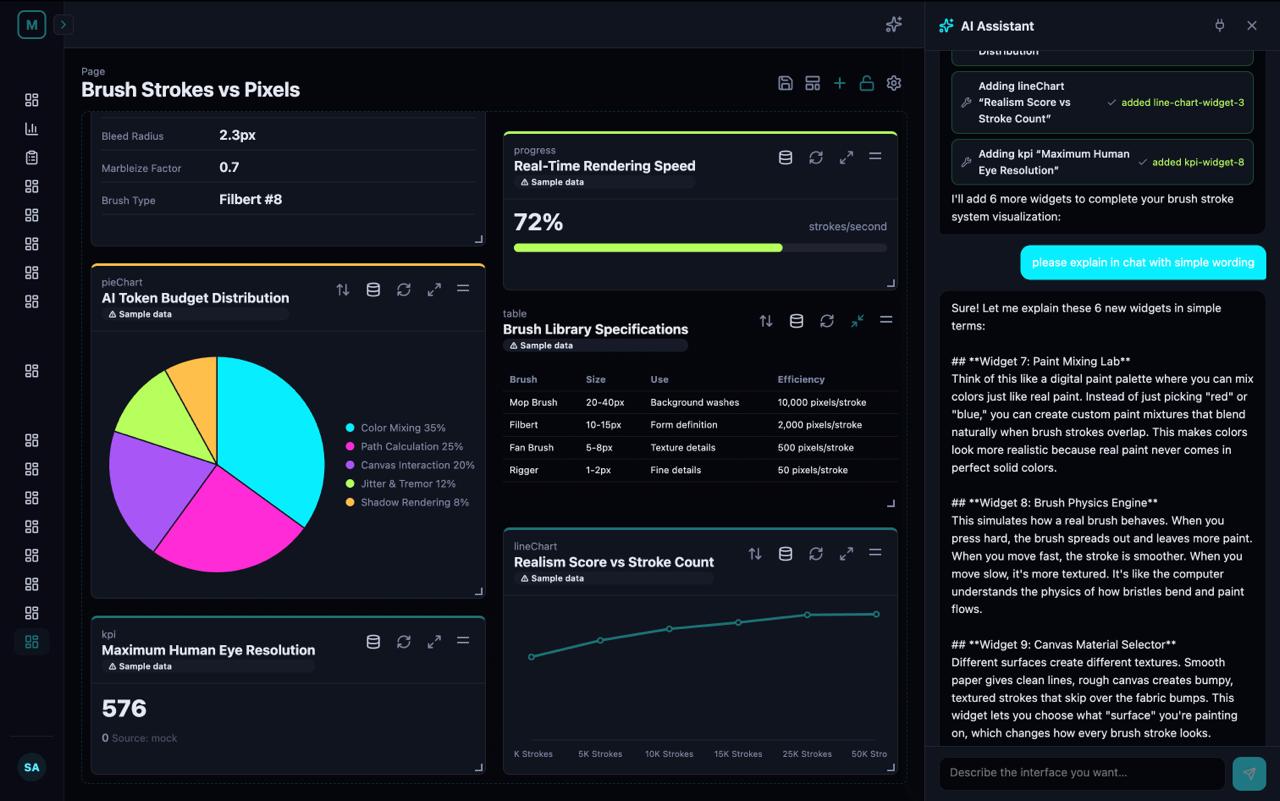
A full screen Mira dashboard, built end-to-end through a single conversation

A full Mira dashboard, built end-to-end in a single conversation — widgets, charts, tables, KPIs, all bound to live data. One chat turn, every layer of the interface.

A new level of communication with AI — three participants, one loop.

Mira is a conversational AI surface built on two open protocols. Model Interface Protocol (MIP) describes the *interface*. Model Context Protocol (MCP) exposes the *tools*. Together they mean any tool-calling LLM can drive Mira — no agent framework, no orchestration. Claude Haiku, Gemini Flash, GPT-mini, or a local 8B open model is enough. Often *better*.

— · — · — · —
Model Interface Protocol

MIP is sheet music for interfaces.

Today's AI either writes long paragraphs of text or thousands of lines of code that have to compile and bundle before you see anything. Both are slow, expensive, and brittle.

A composer doesn't ship an orchestra with every song — they ship the score, and any orchestra that can read it plays it back. MIP is the score for interfaces. A small, structured description of what should be on screen. The AI writes the score; your computer plays it instantly as a real, interactive interface.

You say:       "Add a sales chart."
Mira writes:   { type: "lineChart", data: "$.sales" }    a tiny line of MIP (~12 tokens)
Screen shows:  📈  a live, interactive chart, in under a second.

Same request through a code-gen tool? ~450 tokens of JSX, then 5–15 seconds of compile and bundle. Through plain LLM chat? A paragraph describing what the chart could look like — and no actual chart.
The interaction

A triangular conversation that converges on insight.

Most AI chat is a straight line: you ↔ AI. Mira adds a third participant — the canvas — and each side speaks its own language.

YOU → MIRA Words

You describe what you want — in any language, at any level of specificity.

MIRA → CANVAS MIP

Mira's reply isn't only words. In the same turn she emits structured tool calls that mutate the canvas in real time.

CANVAS → YOU Vision

The canvas isn't passive. It's a visual reply. You see what the data actually looks like — what's clear, what's missing, what's wrong.

And then the loop closes. Because the canvas just showed you something you didn't know, your next prompt is better — sharper, more specific, deeper. The conversation doesn't drift; it converges into a scaffold of ideas — a sharper map of your own blind spots and a bigger, better picture of whatever you're working through. The interface is the artifact; the real output is understanding.

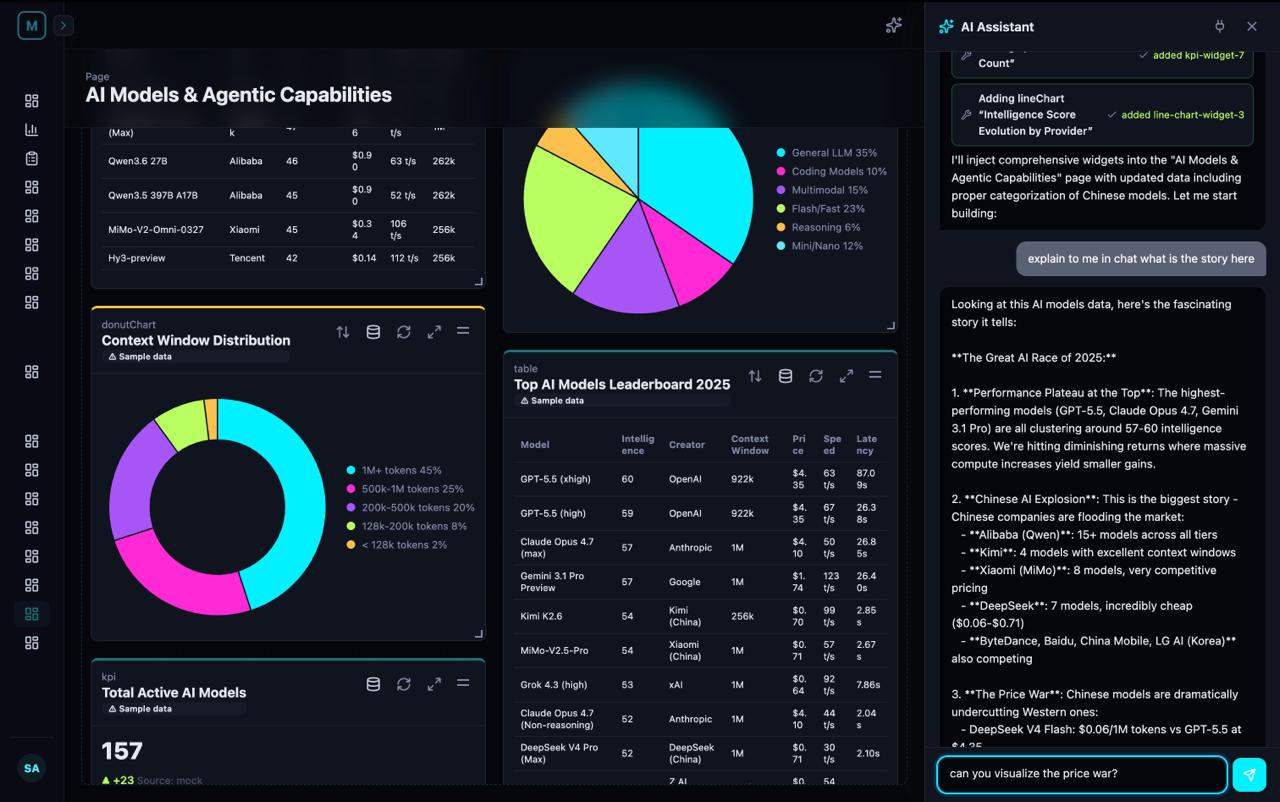
canvas · live
Mira visualizes — building a dashboard widget by widget

Mira visualizes in the canvas — widgets, charts, tables landing one tool call at a time.

chat · explanation
Mira explains — narrating the data in plain language

Mira explains in the chat — narrating the same data in plain language, same conversation turn.

The numbers

Lighter conversation, better output.

Mira's tool calls are tiny because they describe intent, not implementation. Three benchmarks that matter:

3–5×
fewer tokens than plain LLM chat for the same dashboard
10–30×
lighter per edit than code-gen sandboxes (v0, Bolt, Canvas)
< 1s
to render a new widget — client-side, no compile step
Approach
Initial dashboard
Single edit
Time to see it
Mira (MIP tool calls)
~800–1,200 tokens
~40–80 tokens
< 1 second
Plain LLM chat (markdown)
~2k–3k tokens
~200–400 tokens
streaming, no interactivity
Code-gen sandbox (v0, Bolt)
~3k–6k tokens
~1.5k–4k tokens
5–15 s (compile + bundle)
Canvas / Artifact tools
~2k–4k tokens
~2k–4k (full re-emit)
2–5 s per edit
The roadmap

Mira grows through five named levels.

Each level adds a new sense or output channel. The compression idea underneath stays the same — but the interaction surface keeps expanding.

01

Mira·One — Text

Two-column chat + canvas. Mira reads, writes, and reflects intent through MIP tool calls.

LIVE TODAY
02

Mira·Two — Vision

Mira sees the canvas: layout-aware suggestions, screenshot-to-widget input, contextual edits.

SOON
03

Mira·Voice

Real-time voice-to-voice. You speak; Mira speaks back; the interface mutates in sync with the audio.

ROADMAP
04

Mira·Atlas — Ambient

Listens through a meeting, answers visually without breaking flow. Bidirectional voice control.

ROADMAP
05

Mira·Eureka — Live Imagery, Video & VR

Generated visual content live in the conversation: imagery, motion, video, immersive VR scenes. The bridge from screens to spatial computing.

EUREKA
The capabilities

Four tracks that grow Mira's output, reach, direction, and identity.

Parallel to the level progression. Each track is a different axis Mira keeps expanding on, all on the same MIP substrate.

TRACK A

High-fidelity interfaces

Beyond dashboards: marketing sites, onboarding, full design-grade interfaces in a single conversation. Token-efficiency advantage compounds as the interface gets richer.

TRACK B

Expanded apps ecosystem

Pre-wired integrations available the moment you sign in. The endpoint catalog grows; what Mira can build grows with it. Target: 50+ apps.

TRACK C

Read + write — form-to-outcome

Forms that submit to write endpoints, with the outcome rendered live in a neighboring widget. Two-way conversations with your data, in a single turn.

TRACK D

Conversational design system

Talk-to-restyle. Palette, typography, spacing, density, motion — adjustable by talking. The interface restyles in one turn, no widget re-emitted.

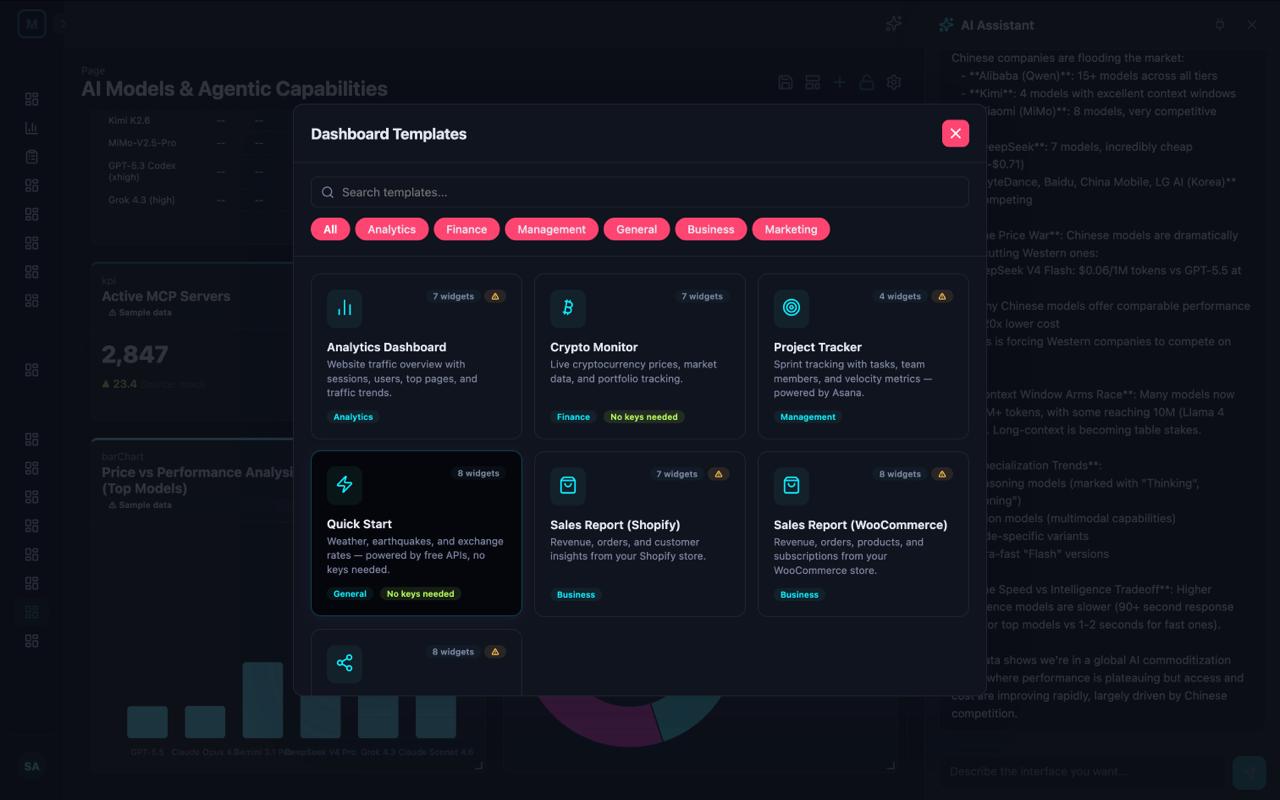
The Templates browser — start from a category or describe what you want

Templates browser — start from a curated category (marketing, sales, ops, finance) or just describe what you want and let Mira compose it. Track B grows this catalog into a wide pre-wired library; today you can already paste a Postman collection or OpenAPI spec to bootstrap a connection.

Looking further

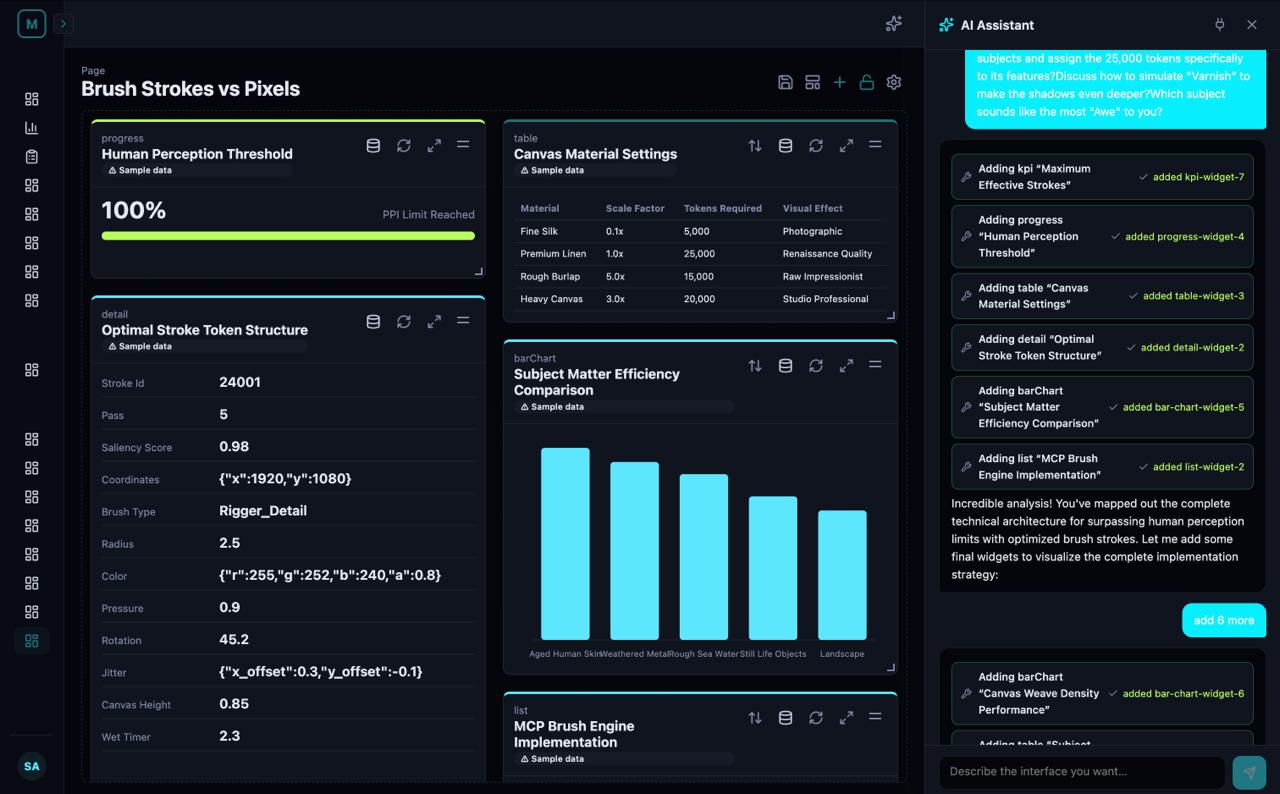
Brush strokes, not pixels.

The compression idea works for more than dashboards. We're exploring it for image generation too.

A 4K image is 8,294,400 pixels. To produce one, today's diffusion models compute and emit a color value for every single pixel — 8.3 million data points. A skilled painter renders the same scene in roughly 10,000 brush strokes. Each stroke isn't a number — it's a procedural token with curvature, pressure, multi-pigment color mix, and 3D impasto height.

The information-density gap is roughly ~830×. Same compression thesis as MIP, applied to a different medium. Stroke models are to image generation what MIP is to dashboards.

Open by design

Yours to host. Yours to own.

No vendor. No lock-in. No data leaks. Mira runs on your machine, with any tool-calling LLM you want — local or cloud, swap on the fly.

01 — Serve it locally

Local runtimes

  • Ollama — easiest. ollama pull qwen2.5:14b, done.
  • vLLM — fastest throughput, OpenAI-compatible server.
  • LM Studio — friendly GUI, model browser, one-click server.
  • llama.cpp — the engine underneath, runs on a Mac mini.

Mira speaks any OpenAI-compatible HTTP endpoint. Drop the base URL in the Connections page, add a token if your runtime needs one, you're live.

03 — Or bring a cloud

Cloud providers

  • Anthropic Claude — Sonnet 4.5 / Opus 4.7 / Haiku 4.5
  • OpenAI — GPT-4.1, GPT-4o, o-series reasoning
  • Google Gemini — 2.5 Pro / Flash, 1M-token context
  • Groq / Together / Fireworks — fast inference for open models

Multi-provider behind one chat surface. Swap models mid-conversation without losing context. Per-connection API keys, stored encrypted, never written into saved dashboards.

0
tokens leave your machine in local mode
16–31B
parameter sweet spot for reliable tool-calling
MIT
protocol license — fork it, embed it, ship it
▸ Pro tips for self-hosting
  • Start with qwen2.5:14b-instruct-q4_K_M via Ollama — about 9 GB on disk, comfortably runs on a single 16 GB GPU or an M-series Mac.
  • Bump context length for long tool-call conversations: OLLAMA_NUM_CTX=32768 (or higher) so Mira's tool-result history doesn't get truncated.
  • Mira uses OpenAI-style function calling. Ollama, vLLM, LM Studio, and llama.cpp's server all support it — verify your chosen model card lists "tool use" or "function calling."
  • For multi-user or higher throughput, switch from Ollama → vLLM. Same protocol, dramatically higher concurrency.
  • The fastest hosted option you might miss: Groq serves Llama and Qwen at thousands of tokens/sec. The chat feels almost local because TTFB is so low.
  • Per-connection API key overrides are stored encrypted; live keys never appear inside saved MIP dashboards.
  • The MIP protocol itself is MIT. Fork it, embed it in your own product, ship a competing runtime — all of that's intended.
settings · connections
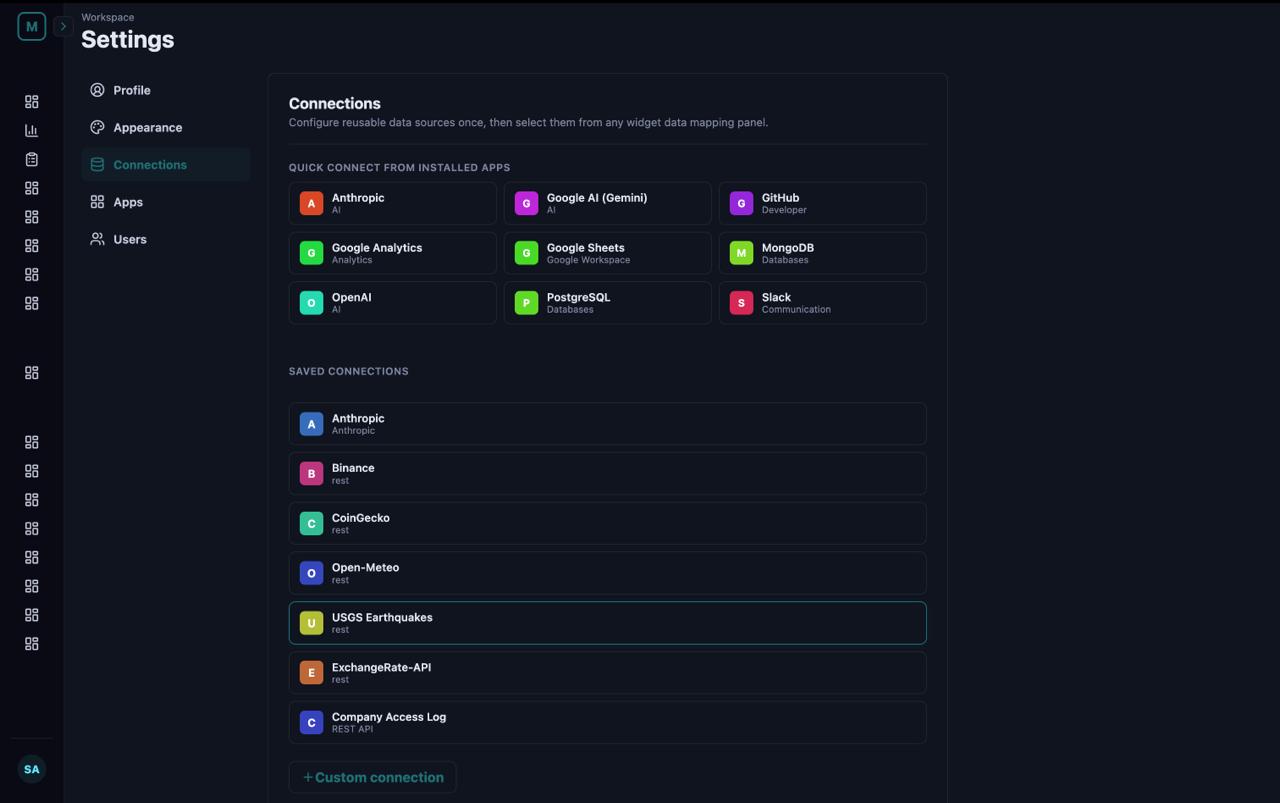
The Connections page — one place to wire every tool your org uses

The Connections page — one chat surface, every tool your org uses. Cloud LLMs, local runtimes, REST APIs, internal data warehouses. Per-source enable/disable for the assistant, encrypted key overrides, OpenAI-compatible endpoints.

Counterintuitive truth

Small models often win here.

Mira doesn't need a frontier model. A small, fast one is usually enough — and often better. The protocol does the heavy lifting; the model just has to pick widgets and bind them to data.

Big models over-elaborate. They write five-paragraph justifications, debate themselves, hedge every claim, and burn tokens explaining what a chart means before they emit it.

Small models think simply. They emit a sharp tool call, then move on. Mira's visual layer turns that simplicity into a chart you understand at a glance — no scrolling, no parsing prose, no waiting on a reasoning loop.

When the model thinks simple, the dashboard reads simple. When the dashboard reads simple, you spot the answer the moment you see it. That's also the power of this system. The constraint of working through MIP tool calls forces clarity at every layer.

The same compression idea that makes the protocol token-efficient makes small models the right tool for the job: they emit fewer tokens, they cost less, they run locally on a laptop, and the output is sharper.

FRONTIER MODELS

Over-engineered for this

Explains the chart in three paragraphs before drawing it. Burns reasoning tokens debating its own choices. Slower; pricier; more verbose. Sometimes useful — usually overkill for visual authoring.

Claude Opus · GPT-4.1 · Gemini 2.5 Pro · DeepSeek R1 (70B+)
SMALL MODELS · RECOMMENDED

Sharp, fast, cheap, clear

Picks a widget. Emits a tool call. Moves on. The visual reads cleaner because the model thinks cleaner. Lower latency, lower cost, easier to self-host. Open-source variants in this tier run on a laptop.

Claude Haiku · Gemini Flash · GPT-mini · Qwen 2.5 7–14B · Llama 3.1 8B · Mistral Small
Get started

The protocol is open. The interface is yours.

Clone the repo, install pnpm, point Mira at any tool-calling LLM. Five minutes to a working two-column conversation.